SpeechRecorder
SpeechRecorder is a platform independent audio recording software customized to the requirements of speech recordings. Its distinguishing features are:
This page was last updated June 29 2026
- Plain or HTML or SVG or RTF formatted text, image, audio and video (Windows only) prompts
to elicit speech in many different ways,
- Unicode text
to display most of the world's languages,
- XML-formatted recording scripts
for a flexible organization of recording sessions, including options for automatic recordings and randomized prompt selection,
- Configurable speaker and experimenter screens
for an uncluttered and appealing graphical interface,
- Platform independence
to run the software on any modern computer, from laptop to desktop.
SpeechRecorder was developed at the Bavarian Archive for Speech Signals (BAS) of the Institute of Phonetics and Speech Processing at Ludwig-Maximlians-Universität München.
This program comes with ABSOLUTELY NO WARRANTY.
Contact: Christoph Draxler, Klaus Jänsch
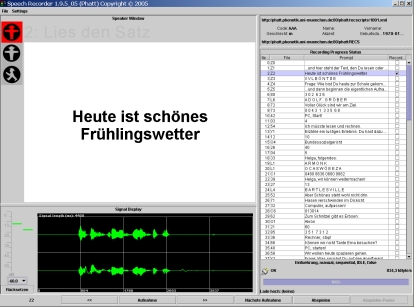
Screenshot:
Requirements:
PC: Windows 10,11 or Debian 12,13 or Ubuntu LTS (only x64/amd64 processor architecture)
Mac: macOS 11 or later
Audio hardware: microphone and headphone or speakers
Installation packages:
Version 6.10.0
Notes:
- Windows on ARM processors, Windows 10 S and Windows X are NOT supported.
Documentation
Manual: PDF or HTML
Release notes
Known bugs and problems:
- The red vertical playback position line is sometimes not removed during playback. Likely a problem with high resolution displays.
- Title texts of selected tabs are barely legible on macOS 11 (Big Sur). A issue in Java OpenJDK. Fixed with version 6.5.3 (uses JRE 17 on macOS)
- Animated GIF prompts are not animated. They are shown as plain images. Fixed: 6.2.2(Bug ID 0113)
- 2016-10-13: Video prompts (Windows only): Video screen overlaps menu. (Cannot be fixed)
- SVG prompts with embedded images do not work with OpenJDK (on Linux) (Apache Batik bug)
- Wrong display of some mark space combining characters (e.g. with Khmer) on Mac OS X. (Bug ID 0020) (Java bug OpenJDK 8065625). Seems to be fixed.
- RTF (Rich Text Format) prompts do not work on Linux ( Sun/Oracle Bug in Java. Very unlikely to be ever fixed.).
- (And many others... Please report.)
Release Notes
Troubleshoot
Older versions and other downloads
List of available versions and downloads.
Development
The source and binary Maven packages are now available in our Maven repository.
Archived old source packages
Privacy Policy: The LMU privacy policy applies.
